 NetSpeed
Your internet speed, alive.
NetSpeed shows your live download and upload speed as a little world that moves with it: a snail when it crawls, a rocket when it flies. Right by the camera, in your status bar and on your home screen.
Free on Android. No ads, no account, no internet permission.
- 🐌 Crawling
- 🚲 Slow
- 🚗 Fast
- ✈️ Flying
- 🚀 Blazing
Bubble, status bar, or both
Pick where your speed lives in one tap: a live bubble by the camera, the classic number by the clock, both at once, or off. Switch any time from the home screen.
- Bubble: the animated scene, placed smartly beside your camera.
- Status bar: the speed next to the clock, no overlay.
- Both when you want it everywhere.
Little worlds that run at your speed
Journey, Runner, Comet, Tachometer, Turbine, Manga, Heartbeat, Fireflies and more. Every scene speeds up and slows down with your connection. Drag "Feel any speed" or press Demo ride to try them before you pick.
- 11 living scenes and 15 motion themes.
- 6 colour skins to match your wallpaper.
- Live previews of every look at any speed.
Sits by the camera. Tells you the speed at a glance.
The bubble fits the gap between the camera and your Wi-Fi and battery icons, never under the camera or over system icons. Make it yours.
- Size: S, M, L, XL or exact width and height.
- Character zoom so the rocket reads at status-bar size.
- 12 fonts, colours, outline, or fully transparent.
- Drag it anywhere, or nudge it pixel by pixel.
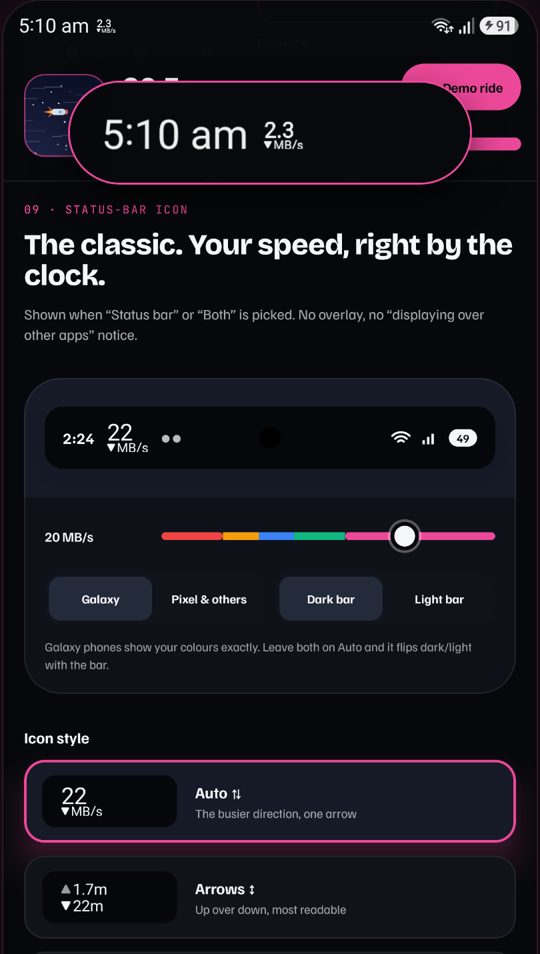
The classic. Your speed, right by the clock.
Prefer a plain number? Status bar mode puts your net speed next to the clock, with no overlay and no "displaying over other apps" notice.
- 5 icon styles: Auto, Arrows ↕, Arrows ↔, Stacked, Compact.
- Your font, text size from 70% to 140%.
- Colours on Galaxy phones, auto light or dark with the bar.
Widgets that move
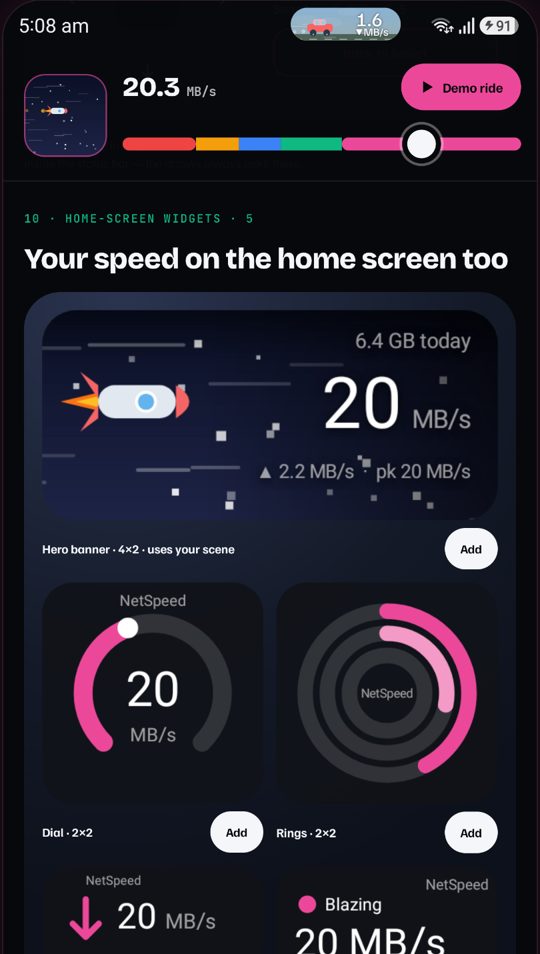
Five home-screen widgets (Hero banner, Dial, Rings, Pill and Weather) with 10 text layouts that keep the numbers clear of the scene.
- Live download and upload, today's peak and average.
- Today's data and a 30-day usage history.
- Daily data cap that fills the Rings widget.
Pick how the numbers sit
Minimal, dual rows, one-liner, pro stats. Choose how the speed reads on banners and widgets, and name your own speed tiers.
- 10 layouts, each previewed live.
- Your tiers: set where Slow, Fast and Blazing start.
- Text position on a 3×3 grid, or let it follow the scene.
See it run, end to end
One minute: first run, setup, the live looks, the bubble and the status bar on a real phone.
And the little things
Small touches that make it feel good to use every day.
Light on your phone
Reads the byte counters once a second, nothing else. In bubble mode it runs without a notification.
Health check
Shows exactly what your phone needs (battery, permissions) to keep the meter running.
Everything free
No ads, no subscriptions, no in-app purchases. Every look and widget is unlocked.
No internet permission. Really.
NetSpeed measures your speed from Android's own traffic counters. The app has no internet permission at all, so your data cannot leave your phone. No ads, no trackers, no account. Read the privacy policy.
Questions
How does NetSpeed measure speed without internet access?
Android counts every byte your phone sends and receives. NetSpeed reads those counters once a second and shows the difference as your live download and upload speed. It never runs a speed test and never connects to anything.
Will it drain my battery?
No. It does one tiny read per second and draws a small view. The built-in health check helps you keep it running without fighting your phone's battery saver.
Where does the bubble go on my phone?
Smart placement finds the gap beside your camera cut-out. You can also put it left of the camera, under the clock, or anywhere you drag it.
Is it really free?
Yes. No ads, no subscriptions and no in-app purchases. Every feature is free.